
Between v0.7 and v0.8, AppErgo’s catalog grew from 10 to more than 150 online tools.
Version 0.7 introduced the first online tools on AppErgo, with around ten utilities divided into a few categories. With v0.8, this part of the website has truly moved to a new scale: the catalog now contains more than 150 tools.
This development was not originally planned when AppErgo was launched. The website was initially intended to serve mainly as a personal forge for presenting and distributing my future Windows software, primarily developed in C++. However, while building the website, the idea of adding a web-based toolbox gradually emerged on its own.
Version 0.8 therefore focuses almost entirely on this new part of the project: expanding the catalog, improving navigation, managing favorites, adding search, protecting privacy, and refining the visual design.
From 10 to more than 150 tools
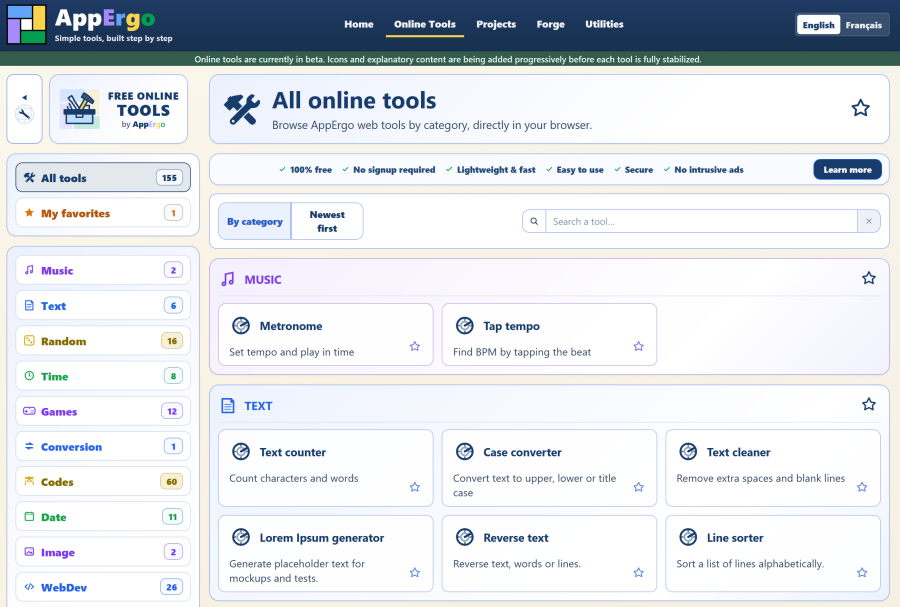
The most obvious change is the size of the catalog. Between v0.7 and v0.8, AppErgo grew from around ten tools to more than 150.
Several categories have been added or considerably expanded. The “Codes” category is particularly extensive, with around 60 tools on its own.
This growth does not mean that every page has become heavy. Individual tool pages remain lightweight and load quickly. Only the “All tools” page is naturally more substantial, since it must display the entire catalog and provide several features to help visitors find what they need.
Despite the addition of a large number of tools and pages, the website remains fast and pleasant to browse. The structure created in previous versions therefore appears solid enough to support this growth without requiring a major redesign.
A reorganized homepage
The homepage has been reorganized and its design has been refined.
It now presents the online tools, categories, and latest additions more clearly, while still retaining the website’s other content. The final homepage planned for v1.0 will probably remain quite similar to this version.
A few visual adjustments are still required, but these are now mostly finishing touches. The overall structure is firmly in place.
The FAQ has also been expanded with a new section dedicated to online tools. It provides clearer answers to questions about how the tools work, privacy, favorites, and AppErgo’s commitments.
More complete tool pages
The catalog pages have also been refined.
They can now include an introduction before the tool, as well as additional information after it. This makes it possible to explain how a tool works, provide useful advice, or add further details without making very straightforward utilities unnecessarily complex.
However, a significant amount of editorial work remains. Each tool must gradually receive its explanatory text, icon, and social media image. Some tools will also require further corrections, testing, and stabilization.
Versions v0.8.1, v0.8.2, and later will therefore mainly focus on completing the catalog. A few additional tools may still appear, but the priority will be to complete and improve the reliability of those already available.
Fast and practical search
The page listing all tools now includes a very fast search function. With more than 150 online tools available, this feature had become essential.
It does not query the website’s database for every search. Instead, it uses a static file generated automatically by the administration system whenever new content, such as a new tool, is added.
The search is then performed directly in the browser using the name, description, and keywords associated with each tool. The AppErgo server is therefore not contacted for every character entered.
This method provides almost instant results despite the size of the catalog. It also makes it possible to find a tool without knowing its exact name, simply by searching for its purpose or the need it addresses.
More practical favorites
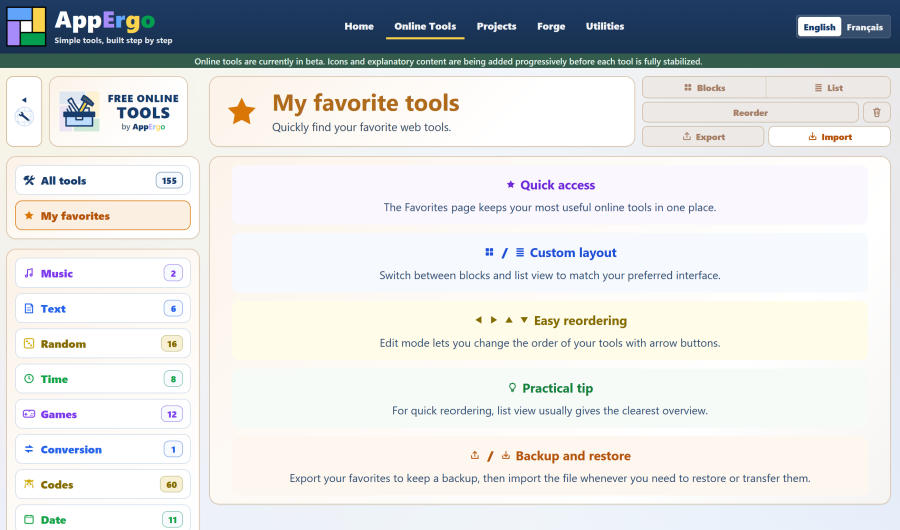
The “My favorites” section was already introduced in v0.7, but it has been expanded in this new version.
Each tool can be added to favorites individually. It is also possible to add every tool in a category at once by clicking the star displayed in the category header.
Favorites are stored directly in the browser’s local storage. They do not require a user account or storage on the AppErgo server.
The section can now export the current selection to a file. This file can later be imported either to restore the saved favorites or to merge them with those already present.
This feature makes it possible to keep a backup, restore favorites after clearing browser data, or transfer them to another computer.
Privacy at the heart of the tools
Every tool in the catalog, without exception, runs directly in the user’s browser.
No data entered, generated, or calculated inside the tools is transmitted to the AppErgo server.
A person using a password generator obviously does not want the generated password to be sent to a server. Likewise, someone trying to solve a puzzle as part of a treasure hunt may not want their clues, ideas, or attempts to be shared with a third party.
With AppErgo, calculations are performed locally. The server provides the page and the files required for the tool to work properly, but it does not receive the content handled by the user.
Search and favorites follow the same principle: everything is processed or stored locally on the user’s device.
Six commitments for online tools
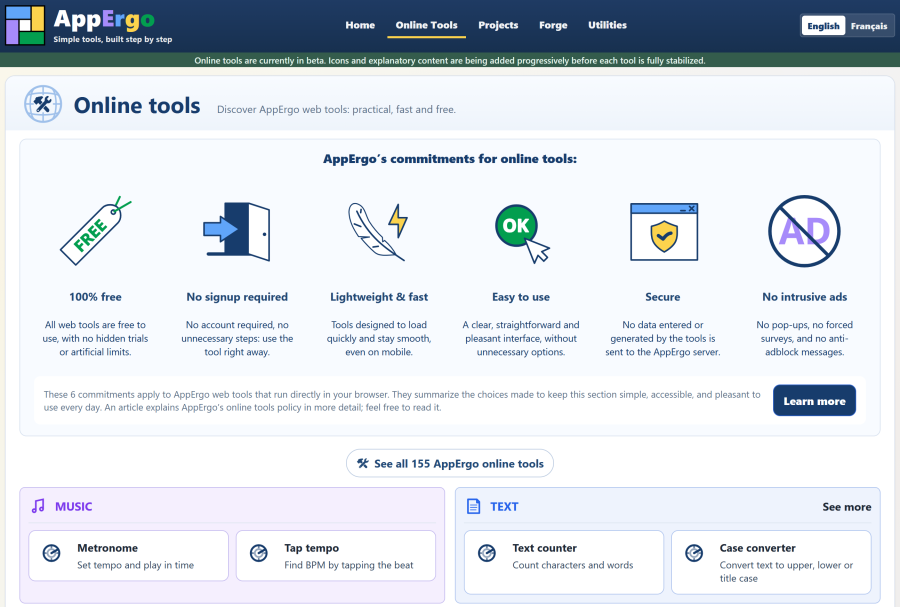
Version 0.8 also formalizes the principles governing the online tools offered by AppErgo. They are now expressed through six clearly displayed commitments:
- 100% free;
- no registration;
- lightweight and fast;
- easy to use;
- secure;
- no intrusive advertising.
These commitments are not merely presentation elements. They define how I want to design and develop this toolbox.
The tools must be available immediately, without requiring an account, locking features behind payment, or imposing unnecessary steps. They must remain fast, clear, and pleasant to use while respecting the data handled by users.
The website must not become a succession of advertising obstacles either. If advertising is introduced one day, it will need to remain discreet and must never interfere with access to the tools.
A toolbox that complements Windows software
Online tools were not part of the original project. AppErgo was initially intended to support my future Windows software, and that objective has not changed.
Once v0.8 has been properly stabilized, v0.9 will probably return more closely to this original idea. C++ development and the creation of Windows applications will soon become a priority again.
However, the web toolbox naturally complements future standalone software.
An online tool can be used immediately, without downloading or installing anything, but an internet connection is required to open its page. A Windows application requires installation, but some versions derived from these web tools may then work entirely offline.
Some tools in the catalog may also serve as a foundation for small Windows utilities. The two approaches can therefore evolve together, each addressing a different type of use.
Conclusion
Version 0.7 introduced the first online tools and established their initial foundations. With v0.8, this part of the website has become more mature: the catalog has expanded considerably, its features have been improved, and the whole section now rests on a stronger foundation.
There is still a great deal of work to do to complete the texts, icons, and images and to stabilize certain tools. The next v0.8 revisions will therefore focus on these finishing tasks.
However, the essential foundations are now in place: a genuine web toolbox that is lightweight, fast, practical, and respectful of its users.