
Developing or managing a website is not just about writing HTML, CSS or JavaScript. It also involves checking the interface, preparing technical rules and understanding what actually happens when visitors and crawlers access the site. AppErgo’s WebDev category currently brings together three tools designed for these checks: testing color contrast, preparing a robots.txt file and analyzing Apache logs. Three different tasks that can be useful before, during and after a website goes live.
Contrast Checker: quickly check readability
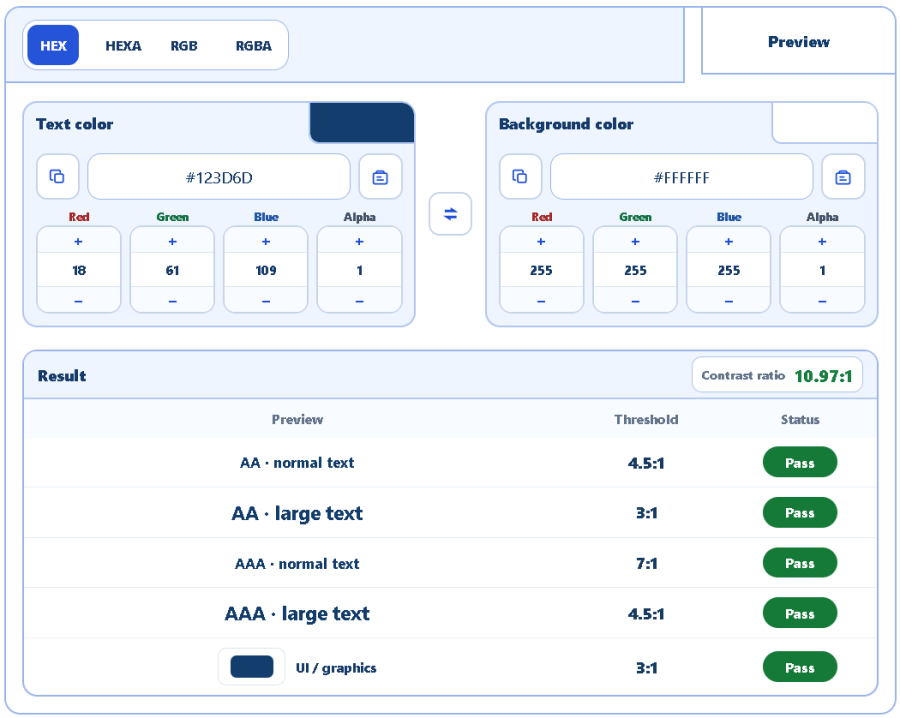
The Contrast Checker compares a text color with a background color to calculate their contrast ratio. It can be used to check the main AA and AAA levels defined by WCAG accessibility guidelines. AA is the level generally targeted for accessible websites: normal text requires a contrast ratio of at least 4.5:1, compared with 3:1 for sufficiently large text. AAA is more demanding, with ratios of 7:1 and 4.5:1 respectively.
The tool makes it easy to test different combinations for text, buttons, links, badges or different component states. It can also complement an audit performed with Google’s PageSpeed Insights. Its accessibility analysis can flag elements with insufficient contrast, and the AppErgo Contrast Checker can then be used to try new color values until a suitable combination is found before running the audit again. A good contrast ratio alone does not, however, guarantee that an entire interface is accessible.
robots.txt Generator: prepare rules for crawlers
The robots.txt Generator helps create the file placed at the root of a website to provide instructions to web crawlers. It can generate User-agent, Allow and Disallow rules, target specific crawlers and add the address of a sitemap without having to write the entire file structure manually.
The tool also aims to produce a readable and compact configuration when several crawlers share the same rules. A robots.txt file is still an instruction for crawlers, not a security mechanism: adding /admin/ to a Disallow rule does not prevent a visitor or a crawler that ignores the rule from accessing that address. Any genuinely private resource must be protected on the server side.
Apache Log Analyzer: see what actually reaches the server
The Apache Log Analyzer turns a raw access log into tables that are easier to explore. It can highlight the most active IP addresses, the most requested URLs, HTTP status codes, 404 or 5xx errors and activity from crawlers such as Googlebot or Bingbot. Filters can also exclude certain static resources or your own IP addresses when they add unnecessary noise to the analysis.
Before analyzing a large log file, the Filter Lines tool from the Text category can also be useful for cleaning it up. For example, you can keep only lines containing Googlebot, Bingbot, a particular IP address, HTTP status code or path, or exclude entries that are irrelevant to the current investigation. This can quickly reduce thousands of log lines to a much more focused extract.
Logs are particularly useful because they show requests that actually reached the server. They can reveal that a search engine is still requesting an old URL, that a crawler is heavily exploring one section of the site or that a resource repeatedly generates errors. Identification should nevertheless remain cautious: a user-agent claiming to be “Googlebot” is not by itself absolute proof of the visitor’s identity, and a visit that appears to come from a human remains an estimate.
Three complementary WebDev tools
These three tools ultimately cover three complementary levels: the Contrast Checker focuses on what users see, the robots.txt Generator on what the website asks crawlers to do, and the Apache Log Analyzer on what the server actually receives. All three work directly in the browser, including log analysis, without requiring the data to be sent to the AppErgo server. They are available in the WebDev category.